If you have an Individual Account on Freedx and lost access to your 2FA, please follow the steps below to submit a 2FA reset request.
1. Preparation
Please prepare the following requirements:
- ID Document: The same ID used for your account verification.
- Transaction Details: Records of your deposits from the last 3 months (including TXID/TxHash, amount, and specific coin/token).
- Common Device: The device you typically use to log in to Freedx.
- Selfie with Statement: Take a selfie holding your ID and a paper with the following handwritten statement:
"I am (your full name), and I am requesting to remove my 2FA. Freedx Exchange. Today's date: DD / MM / YY."
- Email Access: Ensure you can access your Freedx registered email address.
2. Submit a form
Once ready, submit your request through our Self-Service Form:
- Select 2FA Reset as the Request Type.
- Enter all information as required.
- Upload a clear photo of your selfie.
- Click Submit.
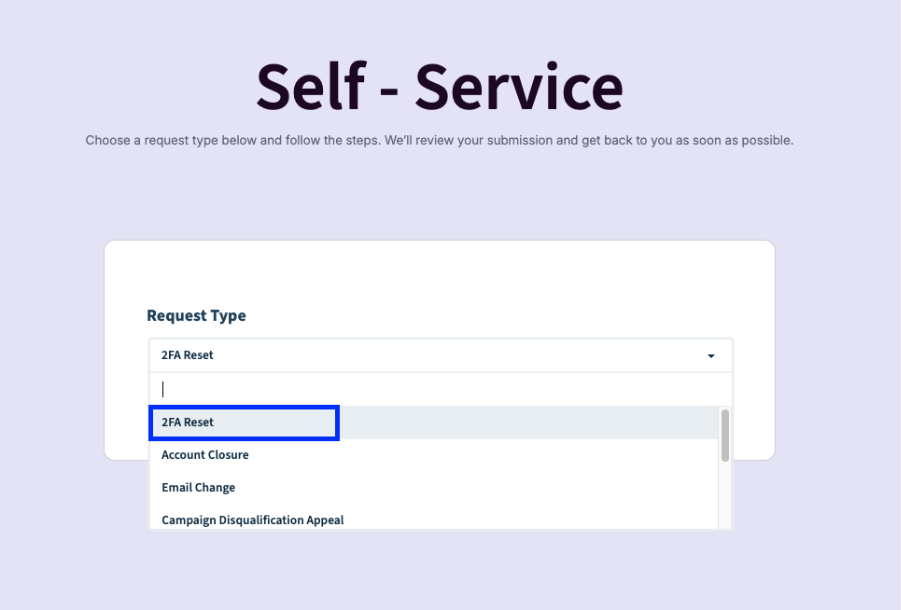
After receiving your request, our team will review and assist with the reset as soon as possible if the information provided is correct.
Important Note:
Please ensure that all the provided information is correct. Failure to provide accurate details will result in a request to resubmit.
In some cases, our compliance team may request additional information or clarification. If so, we’ll reach out to you directly with next steps.
Was this article helpful?
That’s Great!
Thank you for your feedback
Sorry! We couldn't be helpful
Thank you for your feedback
Feedback sent
We appreciate your effort and will try to fix the article